


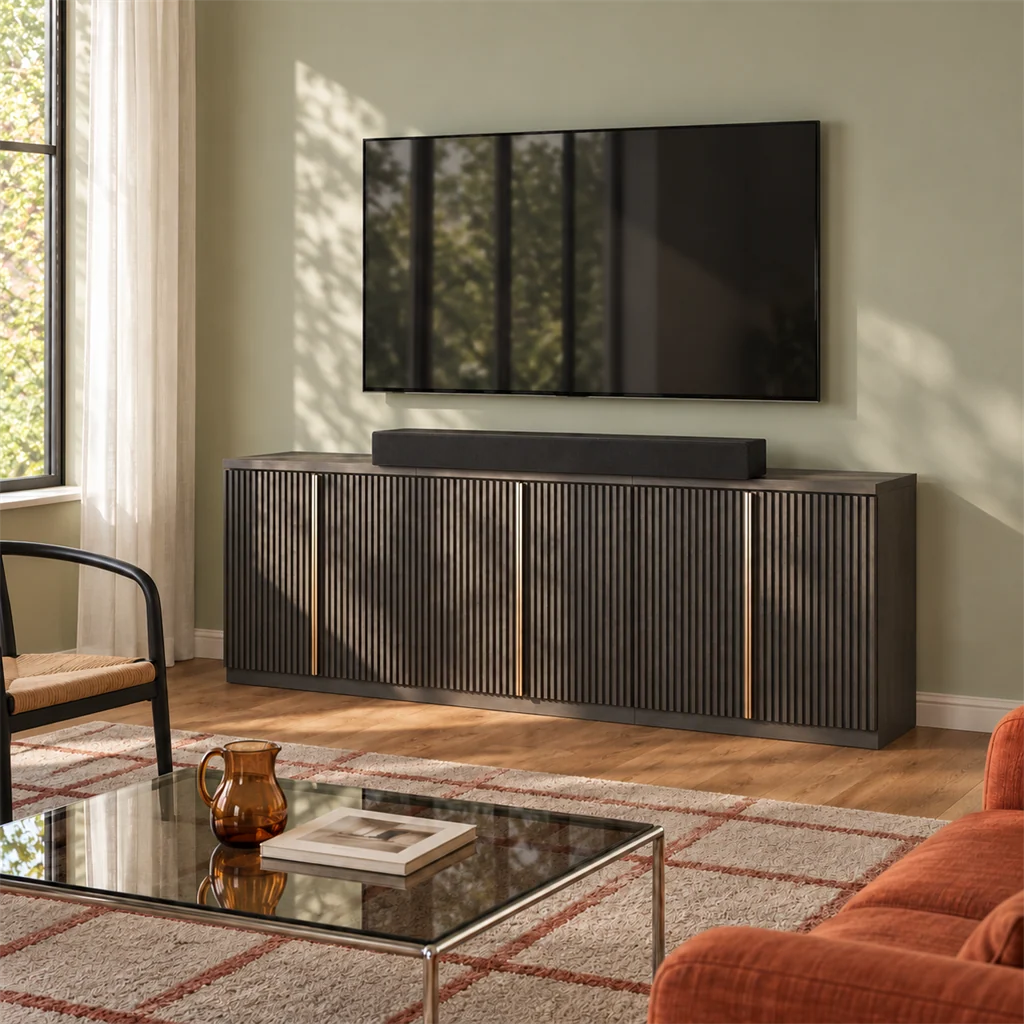
The best place for a soundbar on a TV stand is centered directly under your screen and pulled forward to the front edge of the tabletop, with all its rubber feet resting flat on the surface. Putting it front and center keeps on-screen dialogue locked to the actors, gives you a balanced stereo image, and prevents sound from bouncing off the furniture. Tucking your soundbar inside an open cabinet shelf can also work well to keep the tabletop clean, but only if your specific speaker allows shelf placement and its audio drivers stay completely unblocked.
The Tabletop Sweet Spot: Front and Center
Centering the soundbar directly below the television anchors spoken dialogue to the picture. When you shift the speaker off to one side, voices seem to come from the corner of the room rather than the actors' mouths. Pulling the speaker forward to the front edge matters just as much. Audio makers like Bose recommend keeping the front grille flush with the furniture edge so sound fires straight into your living room. If you push the speaker back toward the TV base, sound waves bounce off the bare tabletop in front of it, which muffles dialogue and softens high frequencies.
Also keep the speaker firmly planted. Make sure every rubber foot under the soundbar sits squarely on the flat tabletop with zero overhang. An overhanging edge risks a costly tip-over, strains your HDMI and power cables, and can create annoying buzzing vibrations when deep bass kicks in during a movie. If your television hangs on the wall right above your media console, the exact same rules apply: center the bar on the tabletop, pull it to the front edge, and leave at least three to four inches of vertical clearance below the screen so sound radiates freely into the room without reflecting off the lower bezel.
How to Measure Your Space Before You Set Up
Tabletop Space: Factoring in Your TV's Base
A TV stand loses most of its usable tabletop depth the minute you set your television down. Instead of total stand depth, look at your usable front ledge: the distance between the front edge of the furniture and the front of your TV base or legs. If your television uses wide-set legs near the outer corners, measure the clear distance between them. Compact soundbars can often slide neatly between wide legs, but longer soundbars must sit entirely in front of the TV. In that case, your front ledge depth needs to be deeper than the soundbar itself.
Always measure your soundbar with its power cord and HDMI cable plugged into the back, because stiff connectors and gentle cable bends easily add two extra inches of depth. For vertical clearance under a tabletop TV, measure from the furniture surface up to the bottom edge of the screen, find your TV remote sensor, and subtract the soundbar height. That leaves you with your actual vertical gap. Sit on your sofa to confirm the speaker does not hide the screen, and double-check that the soundbar depth with cables fits comfortably on that front ledge. If your TV base eats up too much tabletop room, our TV stand size guide walks you through picking furniture with the right balance of depth, width, and weight capacity.

Shelf Space: Measuring the Real Opening
If you want to place your soundbar inside an open shelf, measure the actual opening rather than the outside dimensions on the furniture box. Decorative face frames, interior uprights, door hinges, and shelf support pins all steal usable width and height. Depth can be tricky too: measure straight back to the rear panel and remember that power and audio cords need room to plug in. If the console has an enclosed back, straight cables will push against the rear board unless the cutout port lines up with your speaker jacks. Also make sure the opening leaves enough hand room above the unit so you can easily reach any top control buttons.
Can You Tuck the Soundbar Inside an Open Shelf?
Stashing a soundbar inside an open shelf keeps your tabletop clear, but it only works if the cabinet front has no doors or glass, the compartment gets plenty of air, and the furniture walls do not block any speaker drivers. Putting a multi-directional soundbar into a tight cubby traps sound waves inside the cabinet, giving you hollow, muffled audio.
A quick comparison helps you decide whether your speaker belongs on top or inside a cubby:
| Position | Best For | The Main Catch |
| Tabletop | Default choice for any soundbar, especially Dolby Atmos and surround models | Takes up front ledge depth; can block low TV screens or corner remote sensors |
| Open Shelf | Forward-firing compact speakers whose manuals explicitly approve recessed placement | Muffles side and upward sound waves; makes rear plugs and top buttons harder to reach |
When Your Speaker's Manual Actually Allows It
Some compact soundbars can live inside open furniture shelves, but they still need breathing room. For example, Sonos notes in its setup guide that the Beam (Gen 2) can sit inside an open credenza shelf as long as you leave at least 2 inches (51 mm) of space on both sides and 1 inch (25 mm) above for the touch controls. Keep the front grille close to the front edge of the shelf, and make sure the back has an opening for airflow.
Whether a shelf actually works comes down to where the drivers fire, not just whether the bar physically fits. For instance, Sonos requires at least 4 inches (102 mm) of space between the top of an Arc and the bottom of your TV when sitting on a tabletop. That 4-inch gap is meant to give its upward-firing drivers room to breathe; it does not mean an Arc belongs in a shelf cubby where a wooden ceiling traps height audio. If you are weighing different furniture styles, our breakdown of open shelves versus closed storage explains how each design manages airflow, dust, and media storage.

Watch Out for Upward- and Side-Firing Drivers
Before placing any soundbar inside a shelf, check which way its drivers fire. Traditional forward-firing models push sound straight into the room, making them a great fit for an open shelf as long as the front grille lines up with the front edge. Soundbars with upward-firing or angled side drivers are completely different: they rely on bouncing audio off your ceiling and walls to create three-dimensional surround sound. Putting those speakers inside a shelf traps sound waves against wooden panels, creating harsh internal echoes and muffled audio.
Do not rely on a Dolby Atmos logo alone to guess driver direction, since some compact soundbars simulate height channels through software rather than physical upward drivers. If your model has physical upward- or side-firing speakers, keep it out of the shelf: an open tabletop is the only place those surround effects can actually bounce off ceilings and walls as designed.
Screen Blocked or Remote Not Working? Here's the Fix
Setting a soundbar in front of your TV usually leads to one of two headaches: the speaker sticks up high enough to cut off subtitles, or it covers the infrared sensor so your remote stops working. Test both from your couch. If your TV ignores the remote, hold it above your head or angle it downward; if it suddenly responds, the soundbar is blocking the line of sight. When your tabletop has extra depth, nudging the speaker an inch forward or slightly off-center often clears the path to a corner sensor without letting any rubber feet hang off the edge. If your soundbar has an integrated IR repeater, it can also catch the remote signal at the front grille and pass it straight through to the TV.
Raising your entire TV stand does not fix clearance issues, because lifting the console moves the television and soundbar up together without changing the gap between them. You need to raise the TV independently. If wall mounting is off the table, first check whether your TV's original stand feet have a secondary, higher mounting slot designed for soundbar clearance (common on many modern Sony and LG TVs). If your television lacks adjustable feet, learning ways to make a TV stand taller with a tabletop riser or universal replacement base provides the extra height you need. Make sure any replacement base matches your TV's VESA pattern and weight, then test your remote and screen line of sight from your normal seat once installed.
Shopping for a New TV Stand? What to Look For
If your current stand simply cannot fit both devices, use your measurements to shop for a better match. You will want plenty of front ledge depth, verified tabletop weight capacity, wide-open shelves for clear sound paths, and rear cutouts for cables. Published furniture dimensions give you a general idea, but always look past outside numbers to find the actual usable space. For example, specifications for the London fireplace entertainment center list shelf dimensions of 36.1 L × 14.3 W × 4.6 H inches. While that 36.1-inch width and 4.6-inch height gives you a good benchmark for a compact soundbar, always check the clear interior opening inside the compartment. Face frames, hinges, and rear cable plugs all shave off usable room and restrict airflow.
Longer soundbars need wide, unbroken shelf space. Specifications for the Avenue modern electric fireplace TV stand list shelf dimensions of 66.2 L × 14.13 W × 5.16 H inches. Before assuming that full span is open from end to end, make sure the center shelf has no interior partition walls or support posts splitting the space. Compare that clear opening with your soundbar's length plus side clearance, make sure no shelf above blocks upward-firing drivers, and check depth so cables plug in without sharp bends.
If you choose a console with a built-in electric fireplace, keep all audio and power cords away from the heater blower vent. Hot air blowing directly against wires can soften cable jackets over time. To confirm exact shelf openings, load limits, and internal schematics for specific models, check the official BELLEZE assembly instructions before buying. If your measurements show you need an expansive, customizable layout, compare modular entertainment centers for flexible storage, or browse our fireplace TV stands to find a console that combines cozy hearth ambiance with dedicated media shelves.
A Quick Final Check from the Couch
Before you kick back for movie night, sit down on the couch to make sure everything is dialed in. Check that the speaker does not cut off subtitles or on-screen menus, and tap your remote from a relaxed angle to confirm the sensor catches the signal. Make sure all speaker drivers have clear paths into the room, leave yourself easy hand room for top buttons, and check that every rubber foot sits flat with plenty of cable slack behind the console.
Once your cables are plugged in safely with plenty of slack, tidy up the remaining wires. Learning practical ways to hide cords behind your TV stand helps you bundle loose power leads, route wires neatly along console legs, and keep your living room clutter-free.

Leave a comment
This site is protected by hCaptcha and the hCaptcha Privacy Policy and Terms of Service apply.